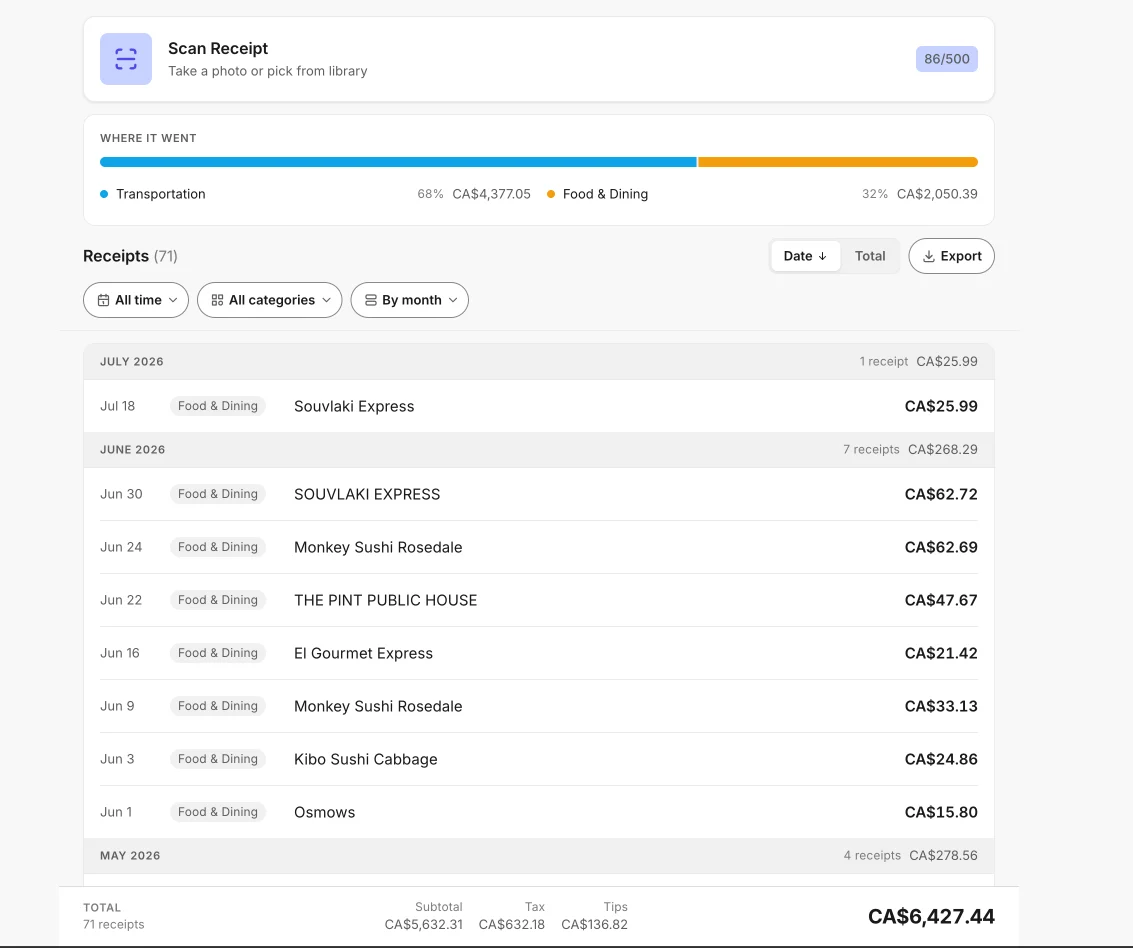
Scan, upload, or email a receipt.
We read it, keep it, show you where the money went, and export it to CSV, XLSX, PDF, or Google Sheets. Nothing to install, nothing to type.
| Date | Merchant | Category | Total | Running total |
|---|---|---|---|---|
| 2026-06-01 | Corner Bakery | Food & Dining | 14.62 | 14.62 |
| 2026-06-03 | Downtown Parkade | Transportation | 12.00 | 26.62 |
| 2026-06-08 | Harbour Print Co. | Services | 86.24 | 112.86 |
| 2026-06-11 | City Utilities | Utilities | 118.75 | 231.61 |
| 2026-06-15 | Coastal Air | Travel | 214.00 | 445.61 |
| 2026-06-19 | Cedar Stationery | Shopping | 43.19 | 488.80 |
| 2026-06-23 | Riverside Bistro | Food & Dining | 58.30 | 547.10 |
| 2026-06-27 | Granville Cinema | Entertainment | 31.50 | 578.60 |
| Month to date 8 receipts, none typed by hand | 578.60 | 578.60 | ||
Prepared 2026-09-05 · awesomereceipts.comPage 1 of 1
Start your own statement.
Sign in with Google or a one-time email code. No password, nothing to download.
How it works
Scan, upload, or email it
Photograph the receipt, drop in the file, or forward the email to scan@awesomereceipts.com.
We read it
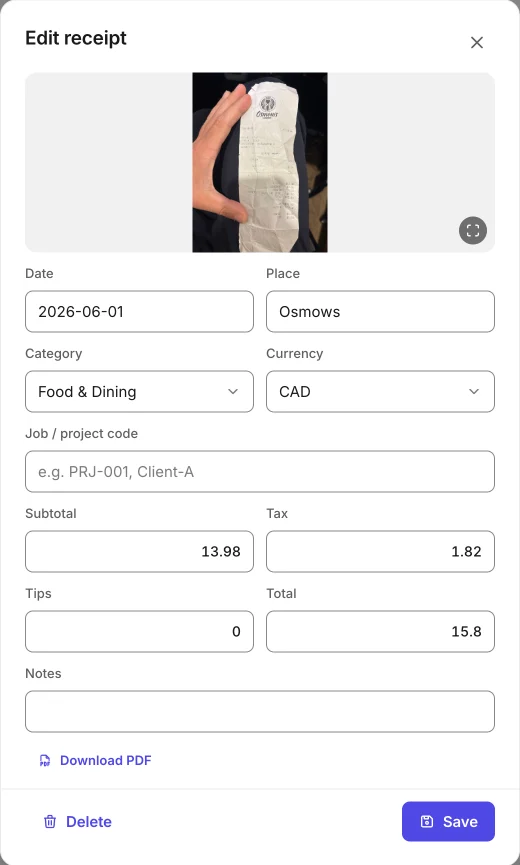
The AI pulls merchant, date, subtotal, tax, tips, total, and category off the image. You fix anything it got wrong.
We keep it
The photo stays attached to the record: encrypted, searchable, totalled by month and category, yours to delete.
You export it
CSV, XLSX, PDF, or a Google Sheet that fills itself in as you scan.
What you export
One row per receipt, 10 columns. The bold ones are read off the image; the rest are yours to fill in or leave blank.
- Date
- Place
- Category
- Job/Project
- Subtotal
- Tax
- Tips
- Total
- Currency
- Notes
FormatsCSVXLSXPDFGoogle Sheets
Fee schedule
50 scans free, one time. Pro is priced but not yet for sale, so everything in it is free today.
Free
Available nowTry it out – no credit card required
- 50 receipt scans (total)included
- AI OCR extractionincluded
- Auto-categorizationincluded
- CSV exportincluded
- Camera + drag-and-drop uploadincluded
- Full desktop modeincluded
Pro
Launching soonor $19.99 / year
Everything in it is free today. Sign up now and keep $3/mo when billing launches.
- Unlimited receipt scansfree today
- PDF, XLSX, & Google Sheets exportfree today
- Text search across receiptsfree today
- Job/project code taggingfree today
- Date range filteringfree today
Pro billing hasn't launched yet. While we finish it, every Pro feature — including unlimited export formats — is included free, and early accounts lock in $3/mo at launch. Full pricing details.
Other providers' fees
Scanning and exporting only. Approval chains, corporate cards, and accounting integrations are what the higher prices pay for.
| Feature | Awesome Receipts | Dext | Expensify | Shoeboxed |
|---|---|---|---|---|
| Starting price | Free, then $3/mo | $25/mo | $5/user/mo | From $9/mo |
| Free tier | 50 scans | 14-day trial | Free for individuals | 30-day money-back guarantee |
| AI receipt scanning | ||||
| CSV / XLSX export | ||||
| Google Sheets sync |
Competitor pricing checked July 2026, from dext.com/pricing, expensify.com/pricing, and shoeboxed.com/pricing. Full breakdowns: Dext, Expensify, Shoeboxed.
Where your receipts live
Encrypted storage
Images are encrypted at rest and reachable only through time-limited links.
Yours to delete
One button in Settings removes your account and every receipt and image attached to it.
No passwords to leak
Sign in with Google or a one-time email code. There is no password of yours to store or lose.
PIPEDA, GDPR, CCPA
Compliant with Canadian, EU, and California privacy law. Read the privacy policy and how storage works.
Questions
The short answers. The full FAQ has the rest.
What is an AI receipt scanner?
An AI receipt scanner reads a photo of a receipt and turns it into structured data — merchant, date, subtotal, tax, tips, and total — without anyone typing it in. Awesome Receipts does this in your browser and writes the result straight to CSV, XLSX, PDF, or a Google Sheet.
Is Awesome Receipts really free?
Yes. The free plan includes 50 receipt scans with full AI OCR extraction, and while Pro billing is being finished, every export format is included free too. No credit card required. Pro ($3/mo or $19.99/yr for unlimited scans) is launching soon.
Do I need to download an app?
No. Awesome Receipts works in any web browser – Safari, Chrome, Firefox, or Edge. Use desktop mode to organize and analyze receipts on a bigger screen, or add it to your home screen on mobile.
What data does the AI extract from receipts?
The AI reads your receipt and extracts the merchant name, date, subtotal, tax amount, tips, and total, and assigns one of 9 expense categories automatically. Currency comes from your account default and can be changed per receipt.
What export formats are supported?
CSV, PDF (per receipt and batch), XLSX spreadsheets, and direct sync to Google Sheets. All four are currently included free; when Pro billing launches, CSV stays free and the other formats become part of Pro.
What happens after the 50 free scans?
You can still view and export everything you scanned; nothing is locked away. New scans will need Pro ($3/mo or $19.99/yr), which is launching soon, and until it launches scanning stays free.
Is my data secure?
Images are stored encrypted, with time-limited access links — never a permanent public URL. We're compliant with PIPEDA (Canada), GDPR (EU), and CCPA (California), and you can delete your account and all data at any time.
Stop typing receipt data by hand.
Open the app, photograph a receipt, export. That's it.
No cardStart free